Cocobi Color Toy Craft - kids
- 2.9
- Rating
- 500.00K
- Installs
- Free
- Price

 Analysis by App-foxy
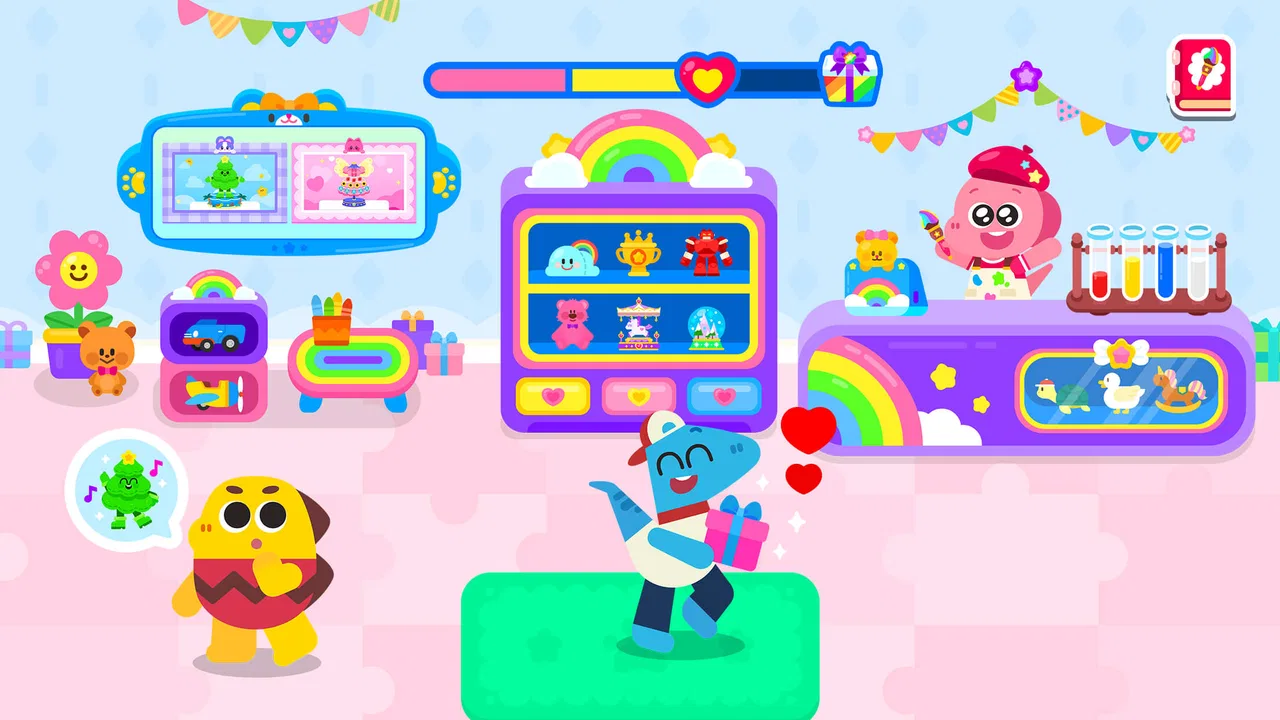
When I first opened Cocobi Color Toy Craft - kids, I understood its appeal almost immediately: it is a small, approachable game built around making colorful toys with the Cocobi characters. It belongs to the educational side of children’s games, but it feels more like a relaxed creative activity than a lesson with scores, tests, or pressure. That makes it easy to introduce to a young child who simply wants to tap, choose, and see something take shape.
The important expectation is to keep the experience in perspective. This is not a deep construction simulator or a large adventure game. Its value comes from short, friendly creative sessions. I would use it when a child needs a calm activity, wants to experiment with colors, or is ready for a first game that does not demand reading skill or complex controls. The age rating is Everyone, and that matches the gentle presentation I would expect from a children’s title.
KIGLE is the developer, and the game is free to install. It has passed the half-million-install mark, while its average rating sits at 2.9 from roughly two hundred ratings. I would treat that rating as a reason to keep expectations measured rather than as an automatic rejection. A child may enjoy the simple creative loop even if an older player finds it too limited. The game is also relatively new, having arrived on January 9, 2026, so the version available now is still early in its life.
You May Also Like

 Blood Strike: 2.5 Anniversary
Blood Strike’s Loadouts Turn Every Drop Into a Tactical Gamble
A close look at Blood Strike’s custom loadouts: how fast access to signature weapons reshapes its battle royale rhythm, rewards preparation, and narrows the gap between fights.

 Pandora - Music & Podcasts
Pandora’s Music Is Easy to Start, but Harder to Recover
Pandora’s strength is its low-effort path from a seed to a station. Its weak spot is how much confidence it asks you to place in connection, setup, and quiet recovery.

 8 Ball Pool
 Is Built on Rivalries, Rematches, and Routine
A close look at the rivalries, rematches, shared routines, and unanswered safety questions that turn a quick pool match into a persistent mobile community.

 Samsung Music
’s Quiet Strength Is Playing What You Already Own
Its reach comes less from spectacle than from dependable access to a personal library. That simplicity is both the app’s strongest retention engine and its ceiling.

 AccuWeather: Weather Radar
AccuWeather Review: A Quick, Clear Forecast for Everyday Decisions
For everyday plans, the best forecast is the one you can understand quickly. AccuWeather makes rain timing, radar, and local conditions easy to act on, with a few trade-offs.

 Hill Climb Racing
Why Hill Climb Racing Still Turns Crashes Into One More Run
A tiny car, a bumpy hill and one more upgrade: Hill Climb Racing keeps resurfacing because its simple chaos makes every near-miss feel personal.
More From Our News Desk
View All News


Getting started without making the first session complicated
The game runs on Android 7.0 and later, which covers many older devices as well as current phones and tablets. Before handing the device to a child, I would install it myself and complete the opening steps. That lets me check how the controls feel on the particular screen, confirm that the child can reach the main activity without help, and decide whether the device is comfortable to hold.
For a first-time user, the best setup is deliberately simple. Use a device with a reasonably clean screen, hold it in the child’s usual position, and begin when there is enough time for a short uninterrupted session. A child who is still learning touch controls can become frustrated if a parent keeps taking the phone away to correct every tap. I found that it is better to give one short instruction, such as “choose a color,” and then let the child discover the next action.
Because this is a visual game, the child does not need a long explanation of the objective. I would avoid turning the opening into a formal teaching moment. Instead, point out the characters, invite the child to select a toy, and ask what color they want to use. That approach makes the first interaction feel like play while still encouraging choices and hand-eye coordination.
Parents should also remember that free does not necessarily mean every part of the experience is without cost. In-app purchases are listed at $1.49 per item. I would review the device’s purchase protections before letting a child play independently. This is one of the most practical preparation steps because a young player may tap an attractive option without understanding that it can lead to a purchase screen.
The current version is 1.0.3. I would keep the game updated through the normal app-store process, but I would not promise a child that an update will change the experience in a particular way. For now, the sensible approach is to judge it by the activity available on the device today and not by possible future additions.
The first meaningful success comes from finishing one toy
The first useful goal is not to explore every option. It is to complete one colorful toy from beginning to end. I recommend sitting beside the child for that first attempt, naming the action as it happens: choose the toy, pick a color, apply it, and look at the result. Even if the child needs help with the first tap, completing one object gives them a clear sense that their decisions matter.
This is also where the game works better than many passive children’s videos. The child is not only watching a character perform an action; they are making a visible choice and seeing the toy change. I would use questions that have no wrong answer, such as “Which color should this part be?” or “Do you like the bright one or the darker one?” That turns a few taps into a small conversation about preference and observation.
A useful trick is to let the child choose the colors before touching the screen. For example, place two crayons or colored objects nearby and ask which one should inspire the toy. This creates a bridge between the digital activity and real-world color recognition without pretending that the game is a complete art lesson. It also helps a child who is hesitant about unfamiliar controls because the decision has already been made before the tapping begins.
I would not rush to correct an unusual combination. If the child chooses colors that seem unexpected, the result is still a successful action. The point of this particular game is the act of making and coloring, not reproducing a parent’s preferred design. Giving the child ownership makes the short session more satisfying and reduces the chance that the game becomes another task where an adult controls every step.
Once the first toy is finished, pause briefly and ask the child to describe what they made. This small pause is more useful than immediately pushing toward another activity. It encourages the child to notice the result, use descriptive language, and understand that finishing is part of the play loop. For a preschooler, that can be a more meaningful outcome than simply moving quickly through several screens.
Where new users may hesitate
The main source of confusion is likely to be the difference between a decorative choice and a step needed to continue. Children’s games often use large, colorful buttons, and a young player may tap several items simply because they look interesting. I would give the child time to test one control, then gently explain what changed rather than taking over the device immediately.
Another common issue is expecting a toy-making game to behave like a free drawing app. The child may look for a blank canvas, a pencil, or unrestricted painting. I would explain that the activity is about coloring and completing Cocobi-themed toys rather than drawing anything from scratch. That single explanation can prevent disappointment for a child who wants open-ended art tools.
There is also a difference between a child who enjoys repeating a familiar action and one who wants constant novelty. This game is a better match for the first kind of player. A child may happily revisit the same style of activity, while another may quickly ask for racing, puzzles, stories, or a larger world to explore. I would not interpret that reaction as failure; it simply indicates that the game’s focused format does not match every child’s interests.
Short sessions are especially important for children who become restless with repetition. I would set a simple stopping point, such as finishing one or two toys, rather than leaving the game open-ended. This makes it easier to end positively and avoids the familiar problem of a child becoming upset when the device is removed in the middle of an action.
Parents may also wonder whether the game is suitable for independent play. My answer would depend on the child’s age, touch-screen confidence, and ability to handle purchase prompts. The basic creative activity is approachable, but I would supervise the first session and remain nearby until I know the child understands the controls. Independent use should be earned through familiarity, not assumed from the Everyone rating alone.
How it compares with other children’s choices
Compared with a standard coloring app, this game has a more character-led identity. The Cocobi friends and toy-making theme give the activity a recognizable setting, which may help a child who loses interest in a plain coloring page. On the other hand, a dedicated coloring app will usually be the better choice for a child who wants a larger range of drawing tools, freehand marks, or more control over every detail.
Compared with educational puzzle games, the learning value here is less formal. I would not choose it as the main tool for practicing letters, numbers, reading, or structured problem-solving. Its educational strength is indirect: choosing colors, following a visual sequence, coordinating taps, and completing a small creative task. That can be worthwhile, but parents should not expect a curriculum hidden behind the toy theme.
Compared with video-based children’s entertainment, the game gives the child more agency. They must make selections rather than simply watch. That makes it a useful alternative when I want screen time to include some participation. Still, it is not automatically better for every situation. If a child is tired and only wants a story, a calm video may fit the moment more naturally; if the child wants to invent freely, a drawing tool may offer more room.
The trade-off is focus. The narrow activity is exactly why the game is easy to understand, but it is also why it may feel small to experienced mobile players. I would recommend it to families looking for a gentle first creative game, not to someone searching for a long-form educational platform with many subjects and progression systems.
Practical ways to get more from a short session
One useful routine is to give each session a tiny theme. Ask the child to make a toy using only warm colors, then try cool colors another time. This does not require a special mode or an invented game rule inside the app; it simply gives the child a reason to make a deliberate choice. It also helps prevent random tapping from becoming the entire experience.
A second approach is to use the game as a transition activity. After breakfast, before a trip, or while waiting for an appointment, one completed toy can provide a contained activity without committing the child to a long play period. I would avoid starting it when the child must leave immediately, because even a short creative task can feel unfinished if it is interrupted at the wrong moment.
A third tip is to let siblings or friends take turns choosing rather than touching at the same time. One child can decide the color while the other performs the tap, then they can switch roles. This is a simple way to make the game more social and to reduce arguments over control of the screen. It works particularly well when one child is confident with touch controls and another is still learning.
I would also use the finished toy as a prompt for offline play. After completing it, the child might build a similar object with blocks, draw it on paper, or search around the room for matching colors. The app does not need to carry the entire educational burden. Its strongest role is as a starting point for a small conversation or hands-on activity.
There is a practical trade-off with in-app purchases as well. Since items are priced at $1.49 each, a parent who wants a completely predictable experience should secure purchases before the child begins. If the child is likely to focus on locked or paid content rather than the available activity, this may be a reason to choose a different game. A free starting point is useful only when the boundaries are clear.
Who should try it, and who should look elsewhere
I think the best audience is a young child who enjoys colors, familiar cartoon characters, and simple cause-and-effect interactions. It is particularly suitable for a first independent attempt at a creative mobile game, provided an adult has introduced the controls and handled purchase settings. The low-pressure structure makes it less intimidating than games that begin with timers, enemies, complicated menus, or several objectives at once.
I would be more cautious about recommending it to older children who expect challenge, detailed customization, or a strong sense of progression. They may finish the central activity quickly and feel that there is not enough variety to hold their attention. I would also skip it for a child specifically asking for academic practice, because the game’s educational value is based on creative interaction rather than direct instruction.
The rating of 2.9 means I would suggest trying it rather than assuming it will be perfect for every family. The install count shows that it has reached a substantial audience, but popularity alone cannot tell me whether its simple format suits a particular child. The most reliable test is a supervised first session: can the child understand the first action, complete a toy, and remain interested without constant adult intervention?
For my own recommendation, that first completed toy is the deciding point. If the child smiles, talks about the colors, or asks to make another one, the game has done its job. If the child immediately searches for drawing tools, puzzles, or a bigger adventure, I would move on without forcing it. There is no benefit in keeping a narrowly focused game installed when a different type of activity would better match the child’s curiosity.
Overall, I see this as a friendly entry point into creative screen play. KIGLE keeps the idea easy to grasp, and the Cocobi theme gives the toy activity a little more personality than a bare coloring exercise. Its limitations are just as clear: it is not a full art studio, not a structured school tool, and not a long adventure. For families who want a free, gentle game that can lead a child from the first tap to one finished colorful toy, it is worth a supervised try. Start with one toy, protect purchases, and let the child’s own reaction decide whether it belongs in the regular play rotation.
FAQs for Cocobi Color Toy Craft - kids
01What age group is Cocobi Color Toy Craft - kids suitable for?
Cocobi Color Toy Craft - kids is designed for children aged 3 to 8 years old. The app offers engaging coloring and crafting activities tailored to stimulate creativity and fine motor skills in young kids. Parental guidance is recommended for younger children to ensure they get the most out of the app's features.
02Does Cocobi Color Toy Craft - kids require an internet connection?
No, Cocobi Color Toy Craft - kids does not require an internet connection for most of its activities. This makes it convenient for parents to hand the app over to their kids during travel or in areas with limited connectivity, ensuring uninterrupted playtime and creativity.
03Are there any in-app purchases in Cocobi Color Toy Craft - kids?
Yes, the app includes optional in-app purchases. These purchases typically unlock additional coloring pages, crafting materials, or other features. It's advisable for parents to manage purchase settings on their devices to prevent unintended purchases by children.
04Is Cocobi Color Toy Craft - kids available on both Android and iOS?
Yes, Cocobi Color Toy Craft - kids is available for download on both Android and iOS platforms. Parents can easily find it on the Google Play Store or the Apple App Store, ensuring accessibility regardless of the device type their children use.
05What educational benefits does Cocobi Color Toy Craft - kids provide?
Cocobi Color Toy Craft - kids offers several educational benefits, including enhancing children's creativity, color recognition, and fine motor skills. The app encourages imaginative play and problem-solving through its interactive activities, making learning both fun and engaging for young minds.
Pros
- Engaging interface for young children.
- Wide variety of colors and tools.
- Easy-to-use with intuitive controls.
- Promotes creativity and imagination.
- No ads to interrupt playtime.
Cons
- Limited to basic coloring activities.
- Requires in-app purchases for full content.
- No option for multiplayer interaction.
- May need supervision for younger kids.
- Limited educational content.

Cocobi Color Toy Craft - kids
Gallery